
Happy New year (2026) and welcome to my first blog in ths year
last year which is two weeks ago I show you how to configure basic configuraton for BGP and publish the internal network but now i have more BGP Peers and let say i have a 1000, that would be annoying to add all those command so the soluton is (Peer Group).
A BGP Peer Group is a configuration feature that bundles multiple BGP neighbors sharing identical outbound routing policies into a single logical entity, simplifying management and improving efficiency by processing updates once for the group instead of individually for each peer, saving CPU/memory. Another way to explain it, a peer-group is a set of BGP neighbors that shares the same Configuration/policy.
Configuration:
On my Simple scenario i have two neighbour so let’s do it
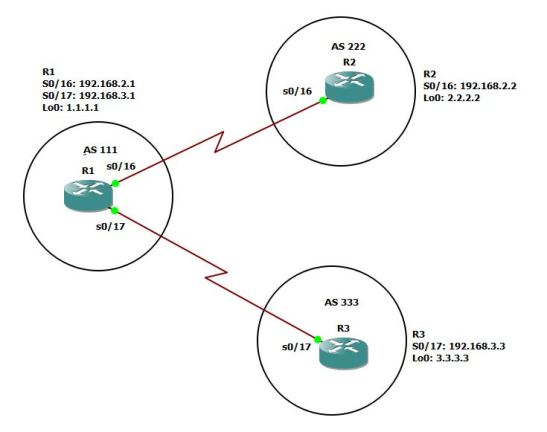
i have my interfaces configure for R1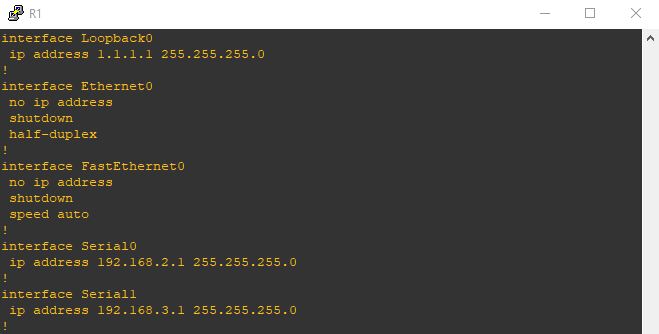
i add a static route for the loopback interfaces of Router2 and Router3
I will repeat the same for other routers
and static route only to Router1 Loopback

and last one is R3
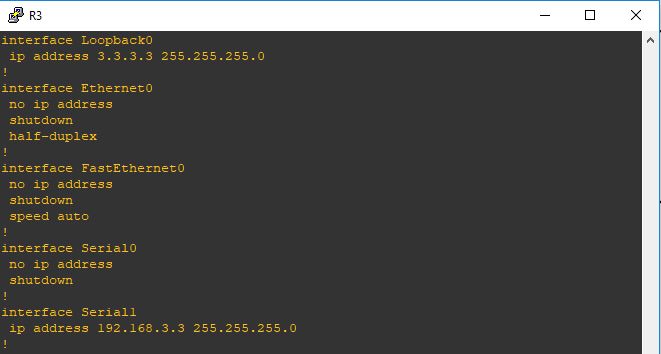
and static route to Router1 loopback
Now the first thing in R1 i will configure the Neihbor command to R2 and R3 loopback
Then i will add both neighbor to a peer-Group (Routers)
Now the loopback interface and ebgp multihop will be added under the Peer-group (Routers)
and that will affect the configuration of both my peers
on the Peer R2 is the normal configuration and nothing extra needed
Same in R3

and as you can see it worked so fine and my BGP is up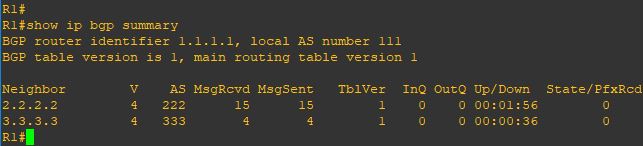
i add a static route for the loopback interfaces of Router2 and Router3
I will repeat the same for other routers
and static route only to Router1 Loopback
and last one is R3
and static route to Router1 loopback
Now the first thing in R1 i will configure the Neihbor command to R2 and R3 loopback
Then i will add both neighbor to a peer-Group (Routers)
Now the loopback interface and ebgp multihop will be added under the Peer-group (Routers)
and that will affect the configuration of both my peers
on the Peer R2 is the normal configuration and nothing extra needed
Same in R3
and as you can see it worked so fine and my BGP is up
Note:
- This is just a simple scenario but you can utilize the Peer-Group Instead of configuring each neighbor with the same remote-AS, route-maps, or filters, you apply them to the group, and members automatically inherit these settings, though inbound policies can often be customized per neighbor
 Root
Root 