
as a network administrator our job is to protect our network
well there is too many ways and telnet is not one of them
using hacking software can show the Password in a clear text so now you fired
Secure Shell (SSH) is a cryptography network protocol provides a secure channel over an unsecured network
i will guide you in the way to configure it in Switch
First Configure the Hostname

Then Configure the Domain Name
Then Generate Key and Choose your Encryption 
Last thing Enable SSH Version

Finally under VTY Configure the Transport Input to Allow SSH only
Now Configure the User 
Now there is many tools you can use for SSH
I Choose Putty
My Switch IP : 192.168.188.5
Connection Type: SSH
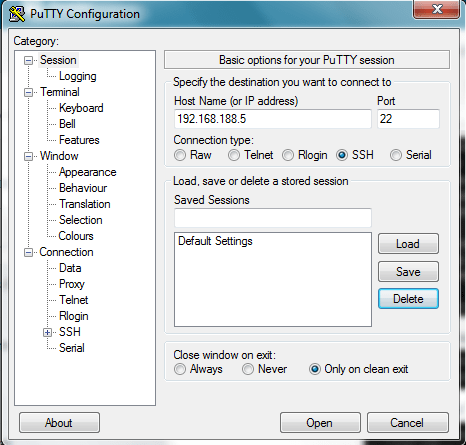
Accept the Security Alert

Login with my User that i created earlier
username:ccieroot
password:ccieroot
That it ;D
 Root
Root 
“Package: IOS, version: 152-1.E3” on this ios, unable to configure ssh.
LikeLike
Not Sure about your Version weather it Support SSH or Not but in case you are Talking About Catalyst 4500 Then Check Here this Link
http://www.cisco.com/c/en/us/td/docs/switches/lan/catalyst4500/release/note/OL_29986-01.html
LikeLike