Collaboration, ILS, URI

URI Dialing Between Clusters

The last blog was about URI Dialing at the same cluster which an easy step https://ccieroot.com/2014/10/30/uri-dialing/
But when it come between cluster there is another new feature Called ILS “Inter-Cluster Look-up Service”
Inter-Cluster Look-up Service (ILS) is a cluster-wide service in CUCM that when configured on and between CUCM clusters, synchronizes information throughout the “ILS Network”.

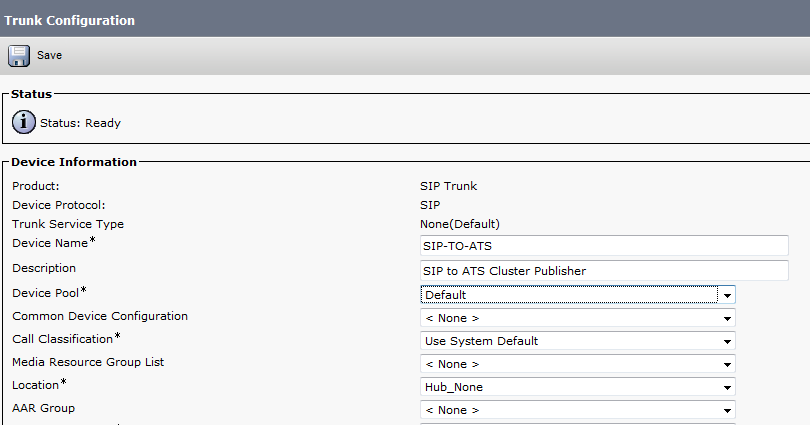
So after finishing configure the Basic URI and made Sure it working we start next step by configure the trunk between both publisher

Go to Device – Trunk Add New and choose SIP Trunk and the Device Protocol also SIP and here is the final Look
Screenshot 2014-10-30 17.17.34


Screenshot 2014-10-30 17.18.04


If you want to use ILS to support intercluster URI dialing, check the Exchange Directory URI Catalogs with Remote Clusters check box in the Intercluster Directory URI Configuration window.
go to Call Routing – Intercluster Directory URI – Intercluster Directory URI Configuration and check the box and choose a name

Screenshot 2014-10-30 17.29.13


Before you start to configure the ILS go to the Enterprise Parameter – Change the name of  Cluster ID From StandAloneCluster to What ever name you wish in out case it’s CCIEROOT

ClusterID


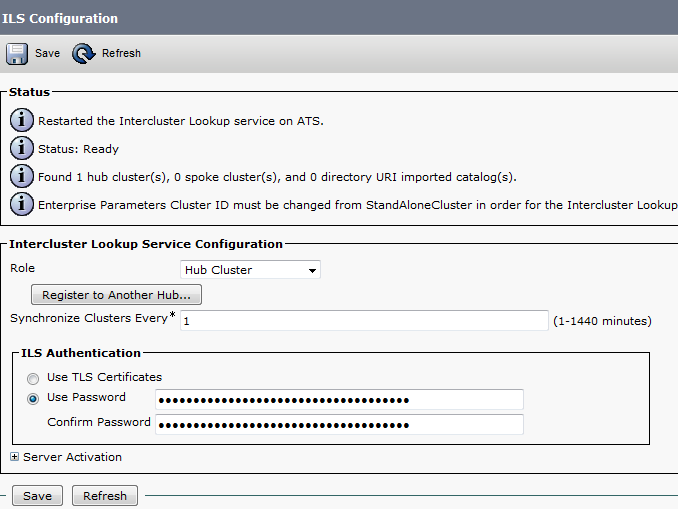
then go to Advanced feature – ILS Configuration
and make your Publisher as the HUB and configure password and press ok but don’t put IP in the field of Registration Server
Screenshot 2014-10-30 17.33.43


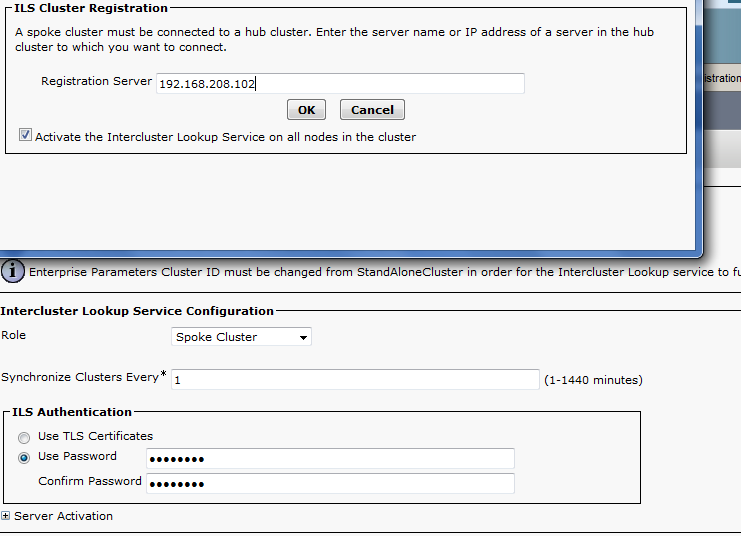
in the Other Server you configure it as a spoke and put the IP of the hub in the Registration Server
Screenshot 2014-10-30 17.38.37


Then Configure the Route Pattern by going to Call Routing – SIP Route Pattern
from CCIEROOT To ATS and in ATS sever you configure a SIP Route Pattern From ATS to CCIEROOT were the IPv4 Pattern is to our ILS URI Configuration name which was MOTO.LOC

Screenshot 2014-10-30 17.40.21


Now you can test the call and it Succeed Between Cluster


Standard
URI

URI Dialing

SIP Uniform Resource Identifier (URI) based dialing One of the 9 newest feature for CUCM version 9
This is beyond anything you imagine Finally we will forget about calling each other by extension number and the we will start typing the email ID instead to make a call. Seriously SIP URI can be best compared to an email address such as Aysar.Mohamed@ccieroot.com or Aysar.Mohamed@mynaghi.com.sa . A users can dial the called party via URI if they are using 8961, 9951 or 9971.
make sure you have to upgrade the IP Phone firemware to 9.3.1

A SIP address or SIP URI is a Uniform Resource Identifier written in user@domain.tld format (semantically, much like an e-mail address). It addresses a specific telephone extension. A SIP URI can be automatically imported from LDAP (provided the cluster is integrated with an LDAP server such as a mail or the msRTCSIP-primaryuseraddress attribute.

Configuration Steps:

The user name is case sensitive however host is case insensitive (RFC 3261). This parameter is configurable starting CUCM 9.1 (under Enterprise Parameters – URI lookup policy)

Go to Enterprise Parameter
Screenshot 2014-10-30 13.25.35


Then when you import the user from LDAP make sure the URI Map to the appropriate LDAP attribute
Screenshot 2014-10-29 22.43.18


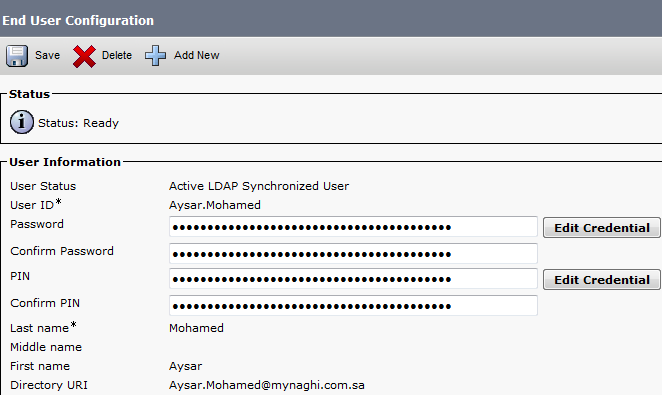
Now if you go to the End User Configuration you will find the Filed of Directory URI is your Email
Screenshot 2014-10-29 22.46.37


Now Configure a phone and Add Dn as you normally Do then go back to the end user and associate the Device and select the primary DN which you want to bind the Directory URI to it

Screenshot 2014-10-29 22.48.00


Screenshot 2014-10-30 11.53.03


Now Check the DN
Screenshot 2014-10-29 22.48.44


Its automatically bind to the DN

*The Directory URI is put into an automatically generated partition called “Directory URI”.  If you wanna call other DN with Directory URI configured, make sure your CSS has the partition Directory URI.*
You can try to make a call now.  It only supports on hook dialing for URI dialing, so you press the new call softkey, the press the “A B C” softkey so that you can enter alphanumeric characters.
If you don’t want to call the full directory URI, you want to call without the domain name, make sure you change the following in the Enterprise parameter.

Screenshot 2014-10-29 22.49.59


Now let’s Test it by dialing
2014-10-30 12.24.35-2


and yes it’s Calling by dialing the email address aysar.mohamed@mynaghi.com.sa not the extension


Standard