
Just when i think everything okay a Nice View Such as Below Appear

I Checked All my HA Configuration and it’s Fine SO
i Define this as Two Issue
Synchronize
App and Threat Mismatch
First lets Solve the Synchronized and it’s a simple Step
Just Next to Running Config Press (Sync to Peer) so it Push the Configuration to the Passive HA

It will Ask you to Overwrite Peer Configuration Just press yes

Now it Start as you See (Synchronization in Progress)
And as you can see now it finished and now its Synchronized 
and now here in the Passive HA and Also show the Same 
Now Lets Move to Next step which is the APP & Threat Mismatch
Lets Check the Version of the Application First
Go to Device – Dynamic updates – and Check the Applications and threats

so Go to 654-3805 which is my Latest Update also you can See in the lower of screen (Check Update)
Then Press Install on Right Side of the Application
Check to Synch to HA Peer
press Continue Installation

Now it will Progress

And Automatically will Transfer a copy to HA Peer
As you See now a Copy Transferred and Installed in HA Peer
And Finally the all your HA Item in the Active Peer is Green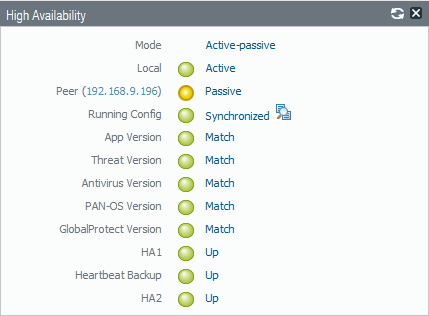
;D
 Root
Root 
As usual will done Aysar
LikeLiked by 1 person
Thanks My Dear
LikeLike
You’re the man Aysar 🙂 You save my time a LOT 🙂
LikeLike
im happy i was in such help brother Junix ;D
LikeLike
Thanks man. You are the best!
LikeLike
You are so welcome and thanks for your comment
LikeLike