
Ever face a Problem with Adding a new Model IP Phone to your Environment such as 8845, 8865 ?
will Luckily Cisco always care about her customer and support them with upgrading their device package always
it’s available in the latest Device Package cmterm-devicepack8.6.2.26169-1.cop.sgn Which can be downloaded from Cisco Software download https://software.cisco.com/download/navigator.html?i=!mmd
I will show you the steps to Upgrade your Device Package
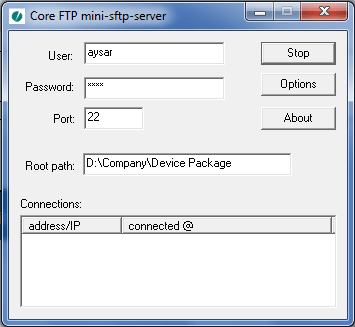
First Turn on your TFTP were you have your Device Package
Then Login to your CUCM OS Admin Page
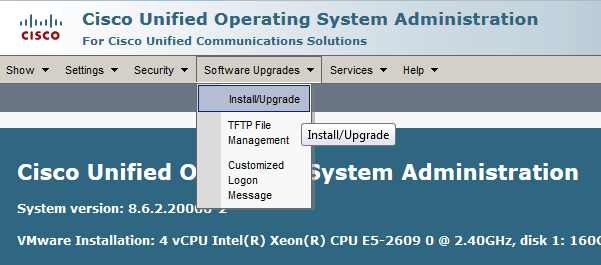
The Choose Software upgrades – Install/Upgrade
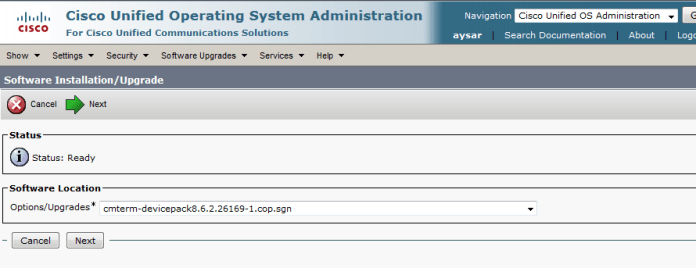
Then Fill the Detail of the SFTP in CUCM page

Press Next and choose the Device Package you want
Press Next and the Downloading of the Device package Start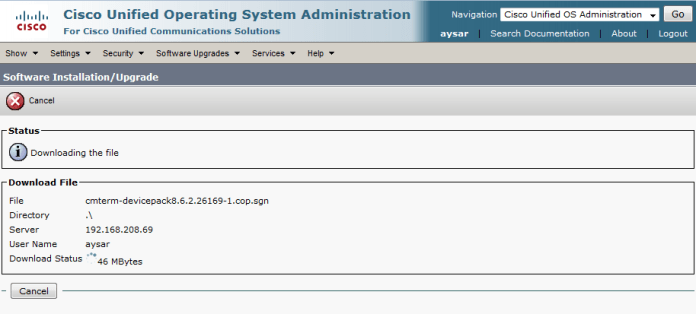
After the Downloading is done it will ask to Install it


Now After it Finish you need to Restart the TFTP Service
go to Cisco unified Serviceability – Tools – Control Center Feature Services and Restart the TFTP Service
in case of a big cluster you need to add the Device Package to each server and Restart them starting by the Publisher
advice always do this after Duty ;D
and Finally will find that you can add your new IP Phone Model 8845, 8865

;D
 Root
Root 
you made it very simple. Awesome work bro
LikeLike
looking for your more videos on migrations part without using PCD !
LikeLike
Hello Jack
i will do my best for a new comeback ;D
LikeLike
Hello Admin!
please kindly share this device pack.
because now it unavailable to download on cisco’s wesite.
Hope you still keep it.
Thanks & Best regards,
Chris
LikeLike
Hello dear
Sorry I don’t have the device pack that was long time ago
LikeLike